 Digital Front Desk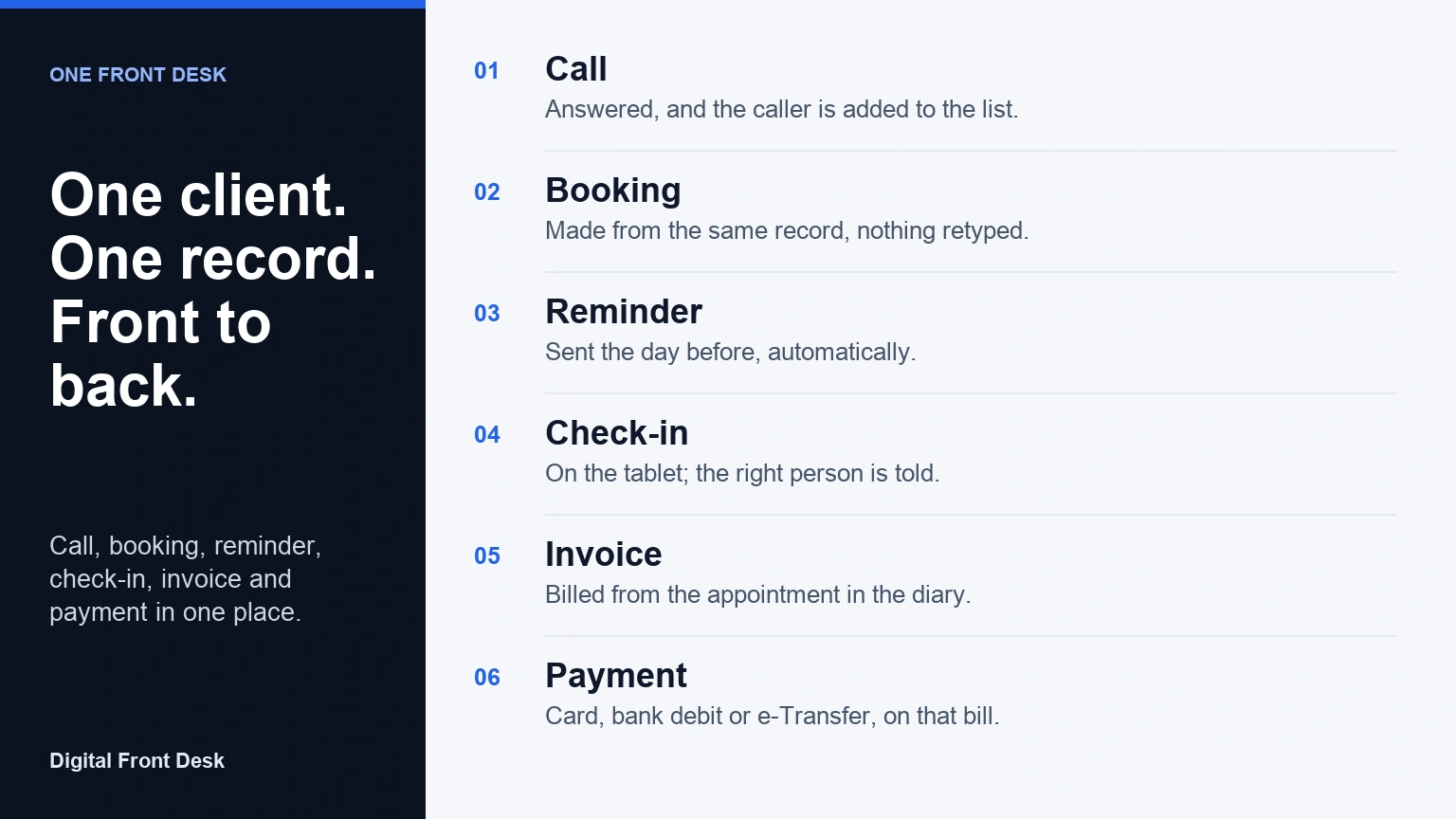
Most small offices did not choose to run their front desk on five apps. It happened one problem at a time: a phone service when calls were being missed, a sign-in tablet when the paper log became a liability, a booking tool, an invoicing tool. Each one works. Together they keep five copies of the same people, and someone at the desk spends part of every day keeping those copies in step.
This article explains why that matters, what it looks like when every front-desk job shares one record of each person, and where the one-system approach stops: what it connects to, what it does not, and who it is not for.
The cost of stitched-together tools
The subscription fees are the visible cost. The larger one is the work in between.
Re-typing. A new client calls. Their name and number go into the phone service's message log. Someone types them into the booking tool. When they arrive, they type their name again on the sign-in tablet. After the appointment, someone types them into the invoicing software. Four entries, four chances for a misspelled name or a transposed digit, and nothing that tells you all four are the same person.
Missed hand-offs. When the tools do not talk to each other, every step between them depends on a person remembering. The call message that should have become a booking sits in an inbox. The appointment that should have been billed is not, because nobody told the invoicing tool it happened. Small offices rarely lose clients to bad service; they lose them in the gaps between systems.
Scattered privacy. Each tool holds personal information, and each has its own retention settings, its own staff logins and its own list of where data is processed. If a client asks what you hold about them, or asks you to delete it, the honest answer means checking every one. A privacy policy that covers five vendors is five times harder to keep true.
Integrations to babysit. The usual fix is to connect the tools: a sync here, an automation there. That works until a vendor changes its fields, a password expires, or the person who set it up leaves. For an office of three to fifteen people, every connection is one more thing that can quietly stop.
What "one record per person" means in practice
The alternative is a single system where the phone, the lobby, the calendar and the bills all read and write the same client record. Here is one client's path through Digital Front Desk, from first call to payment.
The call. Maria calls on Monday afternoon while the desk is busy. The AI receptionist answers with your greeting, works out that she wants a first appointment, and sends you a summary by email or text. Maria is now on your client list, with the call on her record.
The booking. Staff open Maria's record and book her for Thursday at two. Nothing is retyped; her name and number are already there. If you prefer, clients can also request times through an online booking page, and the request is matched to the client list in the same way.
The intake form. If you use one, Maria gets a link to your intake form. Her answers are filed on the same record, so they are there when she arrives.
The reminder. On Wednesday, Maria gets an automatic reminder by email, or by text from your practice's own Canadian number, during reasonable hours and with a way to stop them. Nobody has to remember to send it.
The check-in. On Thursday she signs in on the tablet in your lobby, a tablet you already own, by answering your own questions. The person she is seeing is told by email or text within seconds. If the check-in asks for a phone number or email and your settings allow it, the visit is added to the record she already has instead of creating a second Maria.
The invoice. After the appointment, staff bill it straight from the diary. If you quoted first, an accepted quote becomes the invoice with one button. A deposit taken earlier is already on the bill.
The payment. Maria pays by card or bank debit, through Stripe into your own Stripe account, or by Interac e-Transfer, which the system helps you match to the right invoice before you record it. At the desk, a QR code opens the bill on her phone. The payment lands on the same record as the first call.
Six steps, one person, one record. Anyone at the desk can open it and see the whole history: when she called, what she asked, when she came, what she paid.
What it connects to, and what it does not
One system does not mean no connections. It means the connections are few, and each one exists because a small office actually needs it. Digital Front Desk works alongside:
- Stripe, for card payments and bank debit, paid into your own Stripe account. We never hold the money.
- Interac e-Transfer: paste the deposit notices and each is matched to its invoice for you to confirm.
- Text messages and email, for arrival alerts, call summaries and reminders.
- Spreadsheets: import your contacts from a CSV file, and export the visitor log, contacts, invoices and expenses as CSV. The expenses export is laid out for your bookkeeper's QuickBooks or Xero.
- Google sign-in, instead of yet another password.
- Any iPad or Android tablet for check-in, in its web browser, and an app you can install on a phone or computer.
Customers who add the Autopilot assistant, a private AI machine for one business, can also connect it to their email, GitHub, GitLab and Telegram, only the ones they choose.
What it does not connect to: electronic health records and practice-management systems. If you run a clinic or a therapy practice, Digital Front Desk does not read or write your charts, and it does not need to. It runs the front desk and works alongside the system that keeps the clinical record. For many practices that is a feature: the front-desk tool never holds clinical notes, so there is less to protect in it.
Why fewer integrations is a feature
Large organisations have IT staff to maintain connections between systems. Small offices have whoever is least busy that week. Every integration you do not need is one that cannot break on a Monday morning, one fewer vendor holding a copy of your clients, and one fewer page in your privacy policy.
That is the trade a one-system front desk makes. It will not plug into everything, and it does not try to. In return, the jobs that most often fall between tools — calls becoming bookings, bookings becoming bills — happen in one place, and the data behind them lives in one place too. For Digital Front Desk, that place is Microsoft Azure in the Canada Central region. AI features are processed in Microsoft's US data zone, and calls and texts are carried by Twilio in the United States; the sub-processor list names every service and where it runs.
Who it is for, and who it is not for
A good fit: offices of roughly one to twenty people with a front desk, or a desk that is sometimes empty. Clinics and therapy practices, professional offices, trades with an office, nonprofits, long-term care homes and single-site plants. Particularly offices that currently re-type the same client into more than one tool, or that miss calls because the person at the desk is also the person doing everything else.
Probably not a fit: organisations that need deep, two-way connections into a specific clinical, legal or enterprise system; multi-site enterprises with central IT and existing contracts for each function; and businesses that want desk booking, room displays or badge printers. You do not have to take every part: many customers start with visitor check-in or the phone and switch on the rest later.
Next step
See the pieces together on the homepage, or try the visitor check-in on your own phone at /try/check-in; it saves nothing. If you are weighing where your data will live, read Choosing Canadian-Hosted Front-Desk Software? Six Questions to Ask Before You Sign. To talk it through with a person, book a demo.
Questions about all-in-one front desk software
What is an all-in-one front desk system?
It is one piece of software that handles the jobs a front desk does for visitors and clients, such as answering calls, check-in, booking, reminders and billing, using a single record of each person instead of a separate copy in each tool.
Does Digital Front Desk integrate with my EHR or practice-management software?
No. It does not connect to EHR or practice-management systems and never needs your clinical records. It runs the front desk, such as calls, check-in, reminders and invoices, and works alongside the system that keeps the chart.
Can I use only part of it?
Yes. Many offices start with visitor check-in or the phone receptionist alone and switch on booking, reminders, quotes or invoices later. Each part you add uses the client list you already have, so nothing needs to be moved or re-entered.
Where is the data stored?
Data is stored in Canada, on Microsoft Azure in the Canada Central region. AI features are processed in Microsoft's US data zone, and calls and text messages are carried by Twilio in the United States, as the sub-processor list describes.
Will one system cost less than several separate tools?
It depends on what you pay today and which parts you need, so we do not quote a saving. What changes for certain is the count: one subscription, one account for your team and one supplier, instead of several of each.
Product details describe Digital Front Desk as of the publication date. The linked privacy policy and sub-processor list are the current statements of where data is stored and processed.