For therapy & counselling practices
A sign-in sheet on the counter tells every client who else is in therapy. Digital Front Desk replaces it with a tablet: your client checks in with a first name or initials, their clinician is told discreetly, and no other client's name is ever on the screen.
No card to start. Works on the iPad or Android tablet you already have.
The problem
You protect the session notes, the treatment plan and the intake forms. Then a clipboard at the door lists every client who came in today, in their own handwriting, for the next person to read. A lobby screen that calls names out does the same thing faster.
A paper sheet: every earlier name, on display all day.
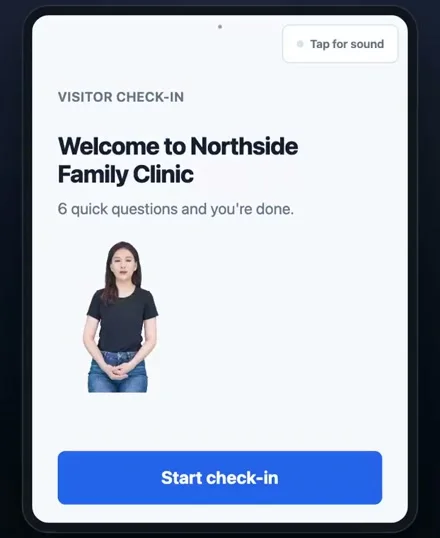
The tablet after a check-in: no name, and no list of anybody else.
How it works
Four moments, from the front door to the session starting on time.
At the tablet by the entrance: a first name or initials and who they are here to see. You choose the questions, and you can ask almost nothing.
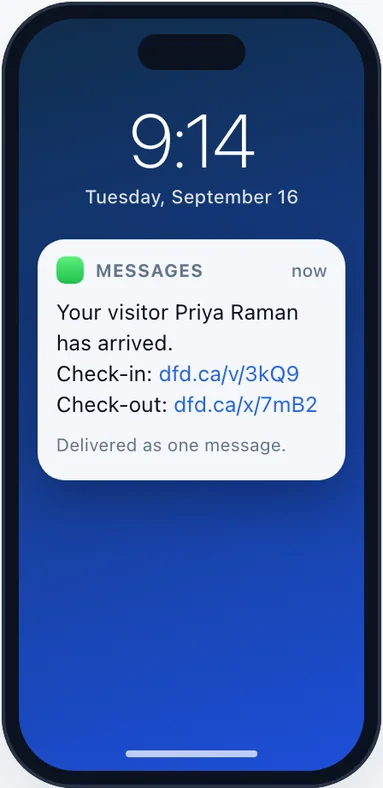
A text or an email that says a client has arrived. You decide whether it carries the client's name or just "a visitor has arrived for you".
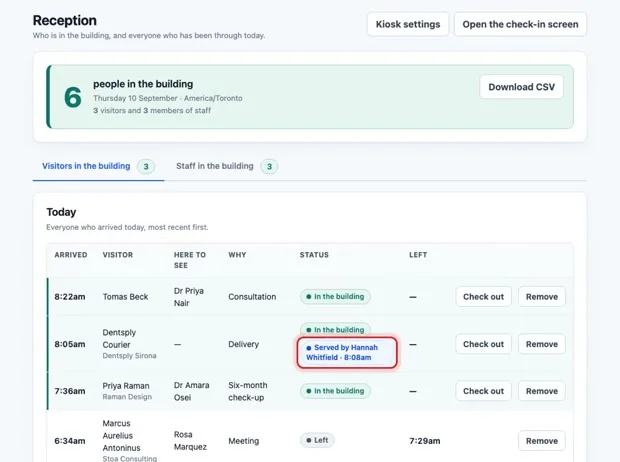
No receptionist needed, no knock on a door mid-session, and nothing left on the counter for the next client to read.
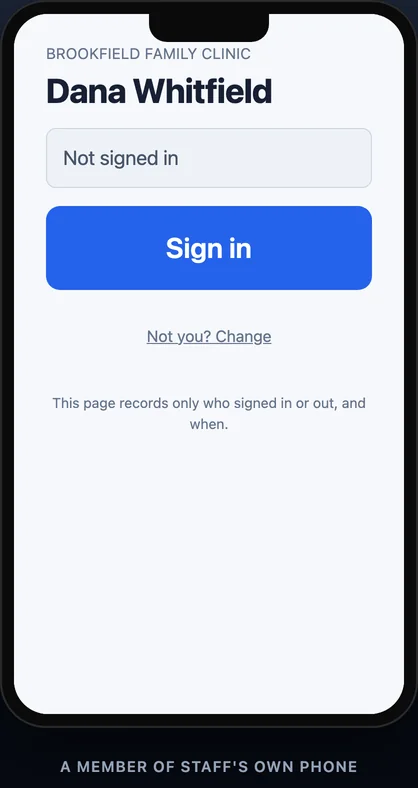
Clinicians and staff sign in from their own phones with a QR code at the door, so you know who is in the building.
Privacy
The defaults are the private ones. A practice turns things on, never off.
The check-in screen never lists who came before. Each client sees only their own confirmation.
Who arrived and when lives behind your staff sign-in, never on a screen in the waiting room.
Photo and ID capture are switched off unless you turn them on. Most therapy practices never do.
On the Privacy settings: keep check-in details, clear them after a number of days, or never store them at all.
When a check-in needs a person, your staff can let it through with the practice's own code, and every override is recorded.
An optional assistant can answer the practice line while you are with a client and pass the message on. Check-in works without it.
Compliance
Digital Front Desk is designed for HIPAA compliance, and it is built to hold as little as possible in the first place.
We sign a Business Associate Agreement with US practices. Ask for it when you sign up or book a demo, and we will send it to you to review and sign.
Every page and check-in travels over HTTPS. The database and file storage are encrypted at rest, and stored credentials and two-factor secrets are encrypted again inside the application.
The visitor log is behind your practice's own staff accounts. Two-factor sign-in is available to every login.
Access to your account's data by our own operators is written to an append-only, tamper-evident audit record. Front-desk overrides are logged too.
A first name or initials is enough. No diagnosis, no reason for the visit, no date of birth is required, and arrival messages can leave the name out entirely.
Clear check-in details after the number of days you choose, or never keep them. Any single record can be erased from the visitor log.
The application, its database and your files are in Microsoft Azure's Canada Central region. The sub-processors page lists every service and where it runs.
HIPAA compliance is shared between a practice and its vendors; no software is "HIPAA certified" on its own. Our privacy policy, retention and sub-processor pages set out exactly what is collected, kept and processed, and where.
On film
Short walkthroughs of the real screens, recorded on the product as it ships.
Pricing
Per practice, per month, in USD (US dollars). Clients are unlimited on every plan. Pay for the year and every plan is 20% less.
A single reception desk.
USD per month, billed monthly
$55 a month billed annually
A clinic, firm or office with a full team.
USD per month, billed monthly
$96 a month billed annually
A care home, campus or multi-building site.
USD per month, billed monthly
$319 a month billed annually
Prices exclude tax.
FAQ
Yes. We sign a Business Associate Agreement with US practices. Ask for it when you sign up or book a demo.
In Canada: the application, its database and your files are in Microsoft Azure's Canada Central region. Some processing, such as AI-generated replies and summaries, runs in Microsoft's US data zone. We do not host in the United States today, and the sub-processors page lists every service and its location.
No. A first name or initials is enough, and you decide which questions the tablet asks. Nothing about diagnosis or the reason for the visit is ever required.
They are already off. Photo and ID capture stay off unless your practice switches them on.
You choose on the Privacy settings: keep them, clear the identifying details after a set number of days, or never store them. Any one record can also be erased from the visitor log by hand.
Not today. Digital Front Desk does not connect to SimplePractice, TherapyNotes or any other EHR, and it never needs your clinical records: it runs the front door, and your EHR keeps the chart.
No. The tablet checks the client in and tells the clinician, so a solo or small group practice can run it with nobody at the desk.
Tell us whether you are a solo or group practice and roughly how many clients you see in a week. We will show you the check-in on a call and send the BAA if you are in the US.
Or email info@digitalfrontdesk.ca.
 Digital Front Desk