 Digital Front Desk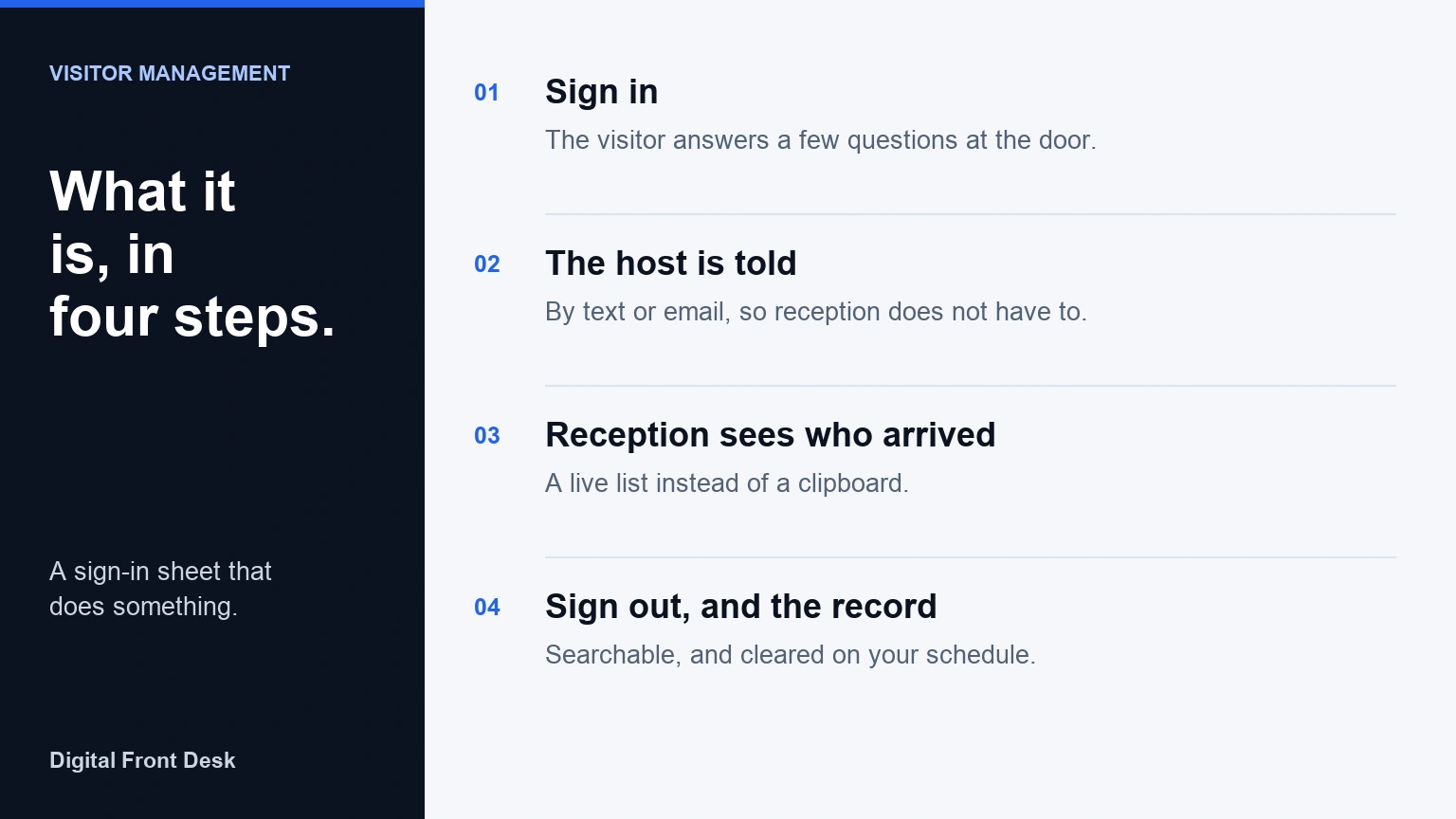
A visitor management system is software that replaces the paper sign-in sheet at your front door. Visitors sign in on a screen, the person they came to see is told, and each visit is kept as a record you can search, export and delete.
Key takeaways
- It does three jobs: signs visitors in, tells the host, and keeps a record.
- It fixes the paper sheet's problems: names on show to every visitor, hosts nobody told, and no sign-out.
- Small offices rarely need an enterprise platform; a tablet you already own is often enough.
- Before choosing, check the hardware, how hosts are told, where data is stored, photo and ID defaults, and whether you can trial the whole loop.
- Digital Front Desk runs in a tablet's web browser, and you can try its check-in screen without signing up.
Put simply, a visitor management system (VMS) is a sign-in book that acts on what is written in it. It takes each visitor's details at the entrance, alerts the person they came to see, and keeps a dated log that the business controls, including who can read it and how long it is kept.
This guide is for small offices, clinics and shared reception desks in Canada deciding whether they need one. It covers how the software works, the kinds on offer, what it costs with the hardware included, the privacy questions Canadian law raises, and where it stops being useful. Digital Front Desk is one worked example, and we say where other products fit better.
What a visitor management system is
At its simplest, a visitor management system is a sign-in sheet that does something with what is written on it. Instead of a clipboard, visitors use a tablet or their own phone. Instead of reception reading the sheet and phoning around, the system tells the right person. Instead of a drawer of old sheets, there is a log you can search, export and clear on a schedule.
The phrase covers a wide range. At one end are simple check-in apps for a single reception desk. At the other are enterprise platforms with badge printers, ID scanners, watch lists, desk booking and room panels across many buildings. A small office usually needs the first kind and too often pays for the second without using it.
How a visitor management system works
Most systems follow the same four steps:
- Sign-in. The visitor answers a few questions on a screen at the entrance: their name, who they are here to see, and sometimes why they came.
- Notification. The system tells the person being visited, by text message, email or a chat app, so reception does not have to find them.
- On site. Reception can see who has arrived and who is still waiting, and some systems print or display a badge.
- Sign-out and the record. The visit is closed when the visitor leaves, and it stays in a log for as long as the business has decided to keep it.
Some systems add staff sign-in, so the count at reception includes employees as well as visitors. That matters on the day someone needs to know how many people signed in.
The quickest way to understand the loop is to walk through it. You can try a working check-in screen without signing up and see each step from the visitor's side.
What it replaces: the paper sign-in sheet
A paper sheet works, and for some offices it is enough. Its problems are well known. Every visitor can read the names written above theirs. Reception still has to tell the host. Handwriting is hard to read, times are guessed, and nobody signs out. Finding last month's visitors means a drawer, and deciding when to shred the sheets is easy to forget.
A visitor management system answers each of those, but it also brings new questions: where the records are stored, who can see them and how long they are kept. If you are not ready to switch, our free visitor sign-in sheet is laid out to collect only what a front desk needs. If you are, replacing your paper visitor log walks through the change.
What a visitor management system is for
The purpose is less about security theatre and more about three ordinary jobs:
- Nobody waits unnoticed. The host is told when their visitor arrives, even if reception is on the phone.
- Reception knows who signed in. A live list replaces guesswork at the front desk.
- There is a record. When someone asks who came on a given day, you can answer, and you can delete what you no longer need.
Paper, a tablet app or an enterprise system: which do you need?
Most of the choice comes down to how many visitors you get and whether someone is always at the desk. The honest answer for many small offices is that a paper sheet is still fine.
| Option | Fits when | Watch out for |
|---|---|---|
| No system | A few visitors a week, all expected, and someone always meets them at the door. | No record if you are ever asked who came. |
| Paper sheet | A staffed desk, low traffic, and nobody minding a drawer of sheets. | Names on show to the next visitor; nobody tells the host; shredding is forgotten. |
| Tablet check-in app | One or a few sites, a desk that is sometimes empty or busy, hosts who need telling. | Monthly fee; check where data is stored and what is collected by default. |
| Enterprise VMS | Many sites, badge printers, ID scanning, watch lists, single sign-on, links to door access. | Price per location and setup work a small office rarely uses. |
Enterprise platforms are the better choice when you run many buildings, need company directory sync or want the sign-in to open a door. A single clinic or office rarely does.
Features that matter for a small office
"Best" depends on the office. For a small business, these questions separate the systems that fit from the ones that do not:
- Hardware. Does it run on a tablet you already own, or does it need a kiosk, a printer or a contract?
- Questions. Can you change what visitors are asked, and keep it short?
- Notifications. Does the host need an account or an app, or does a text or email reach them?
- Privacy on screen. Can the next visitor see who signed in before them?
- Data. Where are records stored and processed, and can you set how long they are kept and erase one when asked?
- Photos and ID. Are they optional, or collected by default?
- Staff and headcount. Can staff sign in too, so the count is everybody?
- Trial. Can you test the whole loop, from sign-in to notification to sign-out, before paying?
To put these to two vendors side by side, print the free visitor management buyer's checklist: the same questions and a few more on retention and leaving, on one page, with no sign-up.
Things a small office can usually do without: badge printing, ID scanning, watch lists and room booking. Each adds cost, and the first two add personal information you then have to look after.
How much does a visitor management system cost in Canada?
Expect a monthly software fee per location plus a one-time hardware cost, which is lower if you already have a tablet. Few vendors print their prices; the figures below were read on each vendor's own page and are shown in the currency that page used.
| Item | Listed price | Source |
|---|---|---|
| Tablet (base iPad, Wi-Fi) | From CA$649 | Apple Canada |
| Tablet stand or enclosure | About CA$160 to CA$320 before tax | Bouncepad Canada |
| Badge printer | Only if you print badges; we could not confirm a current Canadian list price on the maker's page | Check retailers |
| Envoy Visitors, Basic | Free: 1 location, 100 entries a month, up to 50 employees | Envoy pricing |
| Envoy Visitors, Premium | US$362 per location a month, billed annually | Envoy pricing |
| Sign In App | From £415 per site a year (shown in pounds) | Sign In App pricing |
| Digital Front Desk, Starter | $69 CAD a month, up to 20 staff ($55 a month billed yearly) | Our visitor page |
| Digital Front Desk, Practice | $120 CAD a month, up to 50 staff ($96 a month billed yearly) | Our visitor page |
| Digital Front Desk, Campus | $399 CAD a month, up to 500 staff ($319 a month billed yearly) | Our visitor page |
For a first-year budget, add the software for twelve months to whatever hardware you lack. An office that already has a spare tablet pays only the subscription; one starting from nothing should add a tablet and a stand. Enterprise plans are usually quoted, not listed.
We are one of the vendors in that table, so weigh our row accordingly. You can see what each Digital Front Desk plan includes before deciding.
Visitor data and privacy in Canada
A sign-in record is personal information: a name, a time and often a phone number. Canadian privacy law does not ban collecting it, but it does shape how much you take, how long you keep it and what you tell people. None of what follows is legal advice; it is a list of things to check.
- PIPEDA. The federal private-sector law covers organisations that collect personal information in commercial activity. Its principles include limiting what you collect and how long you keep it. Alberta, British Columbia and Quebec have their own private-sector laws that generally apply instead within those provinces (Office of the Privacy Commissioner).
- Data outside Canada. No general federal rule requires visitor data to be stored in Canada, but you stay responsible for information a vendor processes for you, wherever it is processed, and the OPC expects you to tell people it may be processed in another country (OPC guidelines for processing personal data across borders).
- Quebec. Before communicating personal information outside Quebec, including to a vendor that keeps it for you, a business must carry out a privacy impact assessment and put the transfer in a written agreement that takes the assessment's results into account (Act respecting the protection of personal information in the private sector, s. 17). Ask any vendor where data goes so you can do that assessment, and ask your privacy adviser how this applies to you.
- Ontario clinics. Ontario's health privacy law counts information that identifies someone as receiving care from a provider as personal health information (PHIPA, s. 4(1)). A clinic's sign-in log may therefore be health information. Ask your college or privacy adviser before choosing what to collect.
- Alberta clinics. If your clinic is a custodian under Alberta's Health Information Act (for example a physician or dental office), it must have a written agreement with an information manager that stores or processes health information for it (HIA, s. 66). Ask whether a vendor will sign one. Many other practices, such as counselling offices, are not custodians and fall under Alberta's PIPA instead.
Retention, as practice rather than law. Pick a period that matches why you keep the log. Many general offices only need visitor details for a few weeks, long enough to answer "who was here that day", and then clear them. Keep longer only for a reason you can name, and check that the software clears records on schedule rather than keeping them forever.
Where Digital Front Desk keeps your data. Records are stored in Canada. Some processing happens in the United States, including text messages, calls, some voice rendering and AI features (see section 4 of the privacy policy). Both are set out in our privacy policy and list of subprocessors.
For a longer checklist, read Visitor Data in Canada: Five Questions to Ask Before Choosing Check-In Software, and for hosting in particular, what Canadian-hosted front desk software means.
Visitor sign-in at clinics
Clinics have the same front-desk problem with higher stakes, because who came in can itself be sensitive.
- Dental office. Patients are expected and booked. The useful part is often not the log but telling the right person someone has arrived while the front desk is on the phone. Ask only for a name and who they are seeing.
- Therapy practice. Often no receptionist at all, and clients do not want to be seen by the next client. A screen that shows no names, and a host told quietly by text, matter more than any report. See our page for therapy practices.
- Medical clinic. Keep health details out of the sign-in. "Reason for visit" belongs in the clinical record, not on a lobby tablet, If the log may count as health information, check your college's record-retention rules and your privacy adviser before setting how long to keep it.
What a visitor management system does not do
- It is not access control. Access control decides which doors open for whom, usually with cards or fobs. A sign-in screen records arrivals; it does not lock or open anything unless it is wired to a door system.
- It does not know where anybody is. A sign-in list knows who signed in, not where anybody is. People forget to sign out, and some never sign in. Treat the list as a record of sign-ins, not a promise about who is in the building.
- It does not check identity unless ID checks are switched on, and then it holds copies of IDs you must protect.
- More data is more risk. Every extra question, photo or ID scan is something to store, secure and eventually delete.
How Digital Front Desk does it
Digital Front Desk is one example of the small-office kind. The check-in screen is a web page, so it runs on an iPad or any tablet with a browser. Visitors answer one question at a time in large type, and the last screen shows a badge number but no name, because a waiting room can read over somebody's shoulder. It does not print badges.
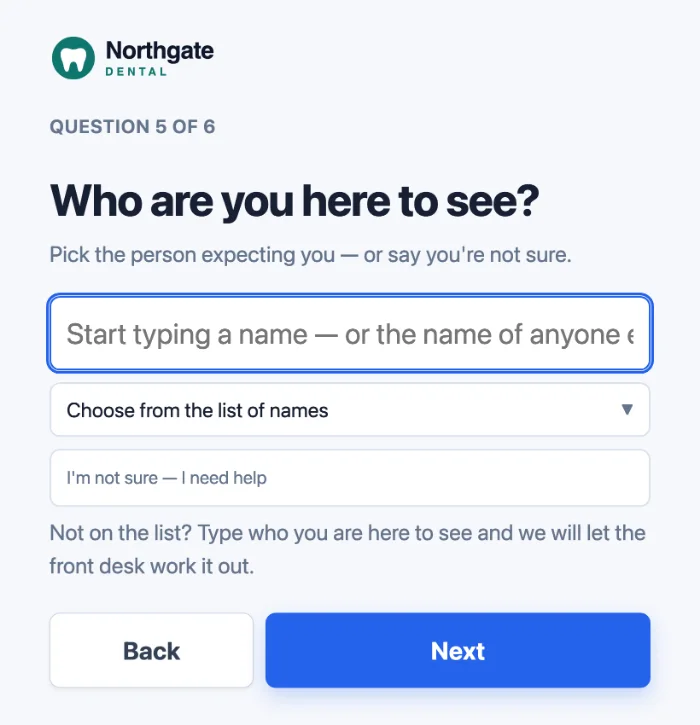
The person they came to see gets a text message or an email, each person choosing which, with two short links: one to say they will take the visitor and one to close the visit. Neither needs a login. If a visitor does not name anyone, the people you nominate for unclaimed arrivals are told instead. Staff sign in and out from their own phones by scanning a poster, and the Reception page counts visitors and staff together and downloads as a CSV file.
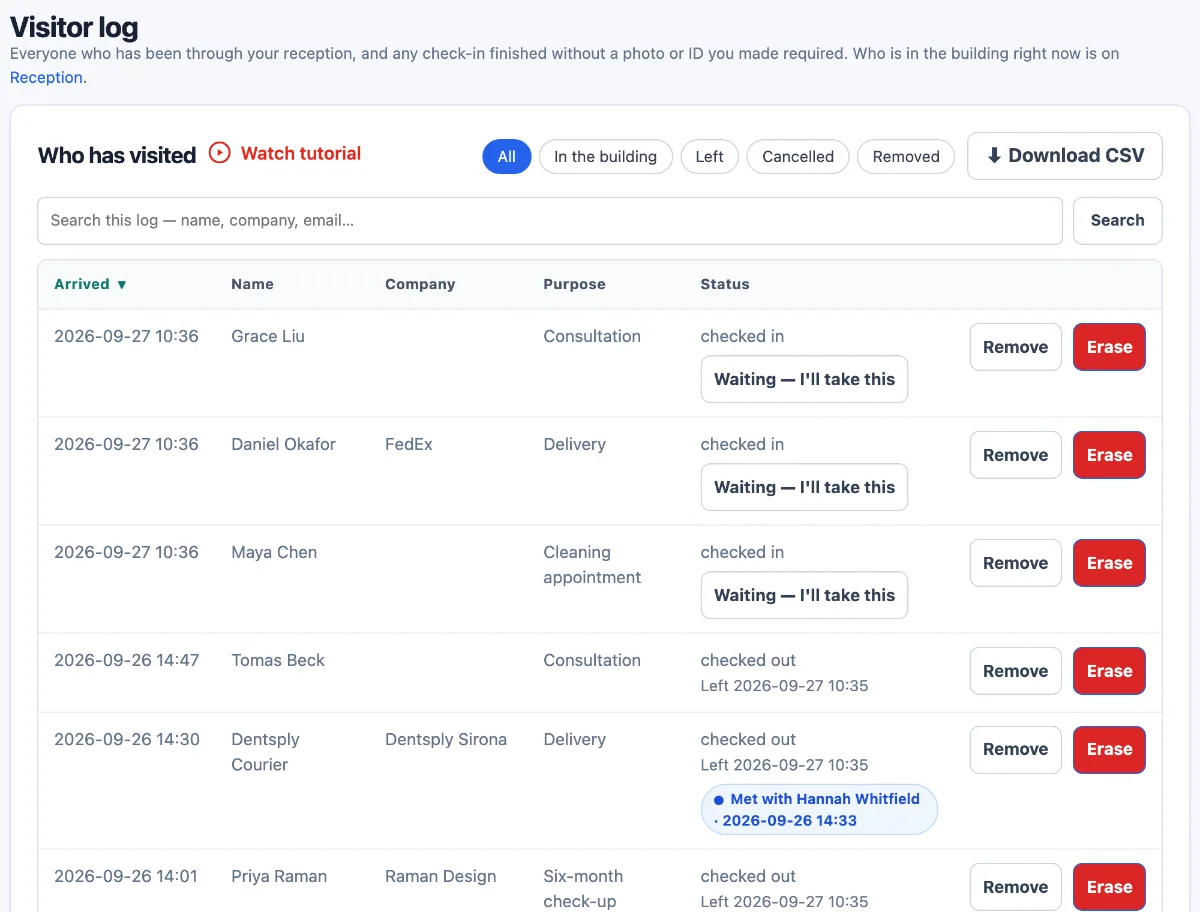
Photographs and ID are off unless you switch them on. You choose whether what a visitor typed is kept, cleared after a set number of days, or cleared once the visit is over; that last choice runs as a nightly clean-up after check-out, so the details exist while the visitor is in the building. Larger sites that need door integration or directory sync will be better served by an enterprise platform.
The fastest way to judge it is to use the check-in screen yourself; there is no account to create.
Questions about visitor management systems
How much does a visitor management system cost?
Small-office plans usually run from free, with tight limits, to a few hundred dollars per location a month, plus a tablet and stand if you lack them. The cost table above lists dated prices from vendors' own pages.
Where is visitor data stored?
It depends on the vendor, and the answer is not always Canada. Ask where records are stored, where texts and any AI processing happen, and which subprocessors are involved, then check the answer in their privacy policy.
What hardware do I need for a visitor management system?
For most small offices, a tablet and a stand or wall mount at the entrance, plus Wi-Fi. Badge printers and ID scanners are optional extras that larger sites tend to want.
Do visitors need to download an app to sign in?
That depends on the product. Many systems, Digital Front Desk included, run the check-in screen in a tablet's web browser, so visitors use the screen at the door and install nothing.
Is visitor management software the same as access control?
No. Access control decides which doors open for whom, usually with cards or fobs. A visitor management system records arrivals and tells people about them; some larger systems connect to access control, but most small-office systems do not.
How long should visitor records be kept?
There is no single period for every organisation. Choose one that matches why you keep the records and any rules for your sector, then check that the software can clear records on that schedule rather than keeping them forever.
Does a small office need a visitor management system?
Not always. If visitors are few and someone is always at reception, a paper sheet may be enough. Software helps when reception is busy, hosts are hard to reach, or you want a record you can search and clear on a schedule.
Can a clinic use a visitor management system without collecting health information?
It can reduce it, by asking only for a name and who the person is seeing and keeping the reason for the visit off the tablet. Even so, a clinic's log may reveal who is a patient, so ask your privacy adviser how to treat it.
Try it before you decide
Try the check-in screen on any device, with no signup, to see the visitor's side of the loop. If it fits, you can start your own front desk or read the visitor management page for plans and setup.
This article is general guidance for choosing software, not legal advice. Prices and law references were checked on 15 October 2026.