 Digital Front Desk
Ontario long-term care visitor log
A printable visitor log laid out to match the fields in O. Reg. 246/22 s.267(2).
Not legal advice. Last checked 7 October 2026 against O. Reg. 246/22 s.267(2).
For Ontario long-term care homes
Visitors sign in on a tablet at your front door. Set it up to ask for the visitor's name and contact information, and add a question of your own, such as “Which resident are you visiting?”, for the resident visited. Each entry is stamped with the time and date: the items O. Reg. 246/22 s.267(2) lists. Your staff see the log, download it with each resident named, and choose how long the details are kept.
Rather look on your own? Try it free. Or start with paper: the free visitor log template (Word, Excel, PDF).
The regulation
The text below is the regulation itself, copied from Ontario e-Laws. We have not shortened it or added to it.
"Every licensee of a long-term care home shall maintain visitor logs for a minimum of 30 days which include, at a minimum, (a) the name and contact information of the visitor; (b) the time and date of the visit; and (c) the name of the resident visited." O. Reg. 246/22, s. 267 (2). Ontario e-Laws
Thirty days is a minimum, not a deadline to delete. The regulation does not require the log to be electronic, does not ask for a signature, and does not ask for a departure time. A paper book that records the three items above meets the wording; a tablet makes it legible, searchable and harder to skip.
Section 267(1) separately asks for a written visitor policy, covering visits in normal times and during an outbreak, a written record of caregiver designations, and continued access for essential visitors. Our visitor policy checklist walks through it.
How it works
Laid out to match O. Reg. 246/22 s.267(2), field for field.
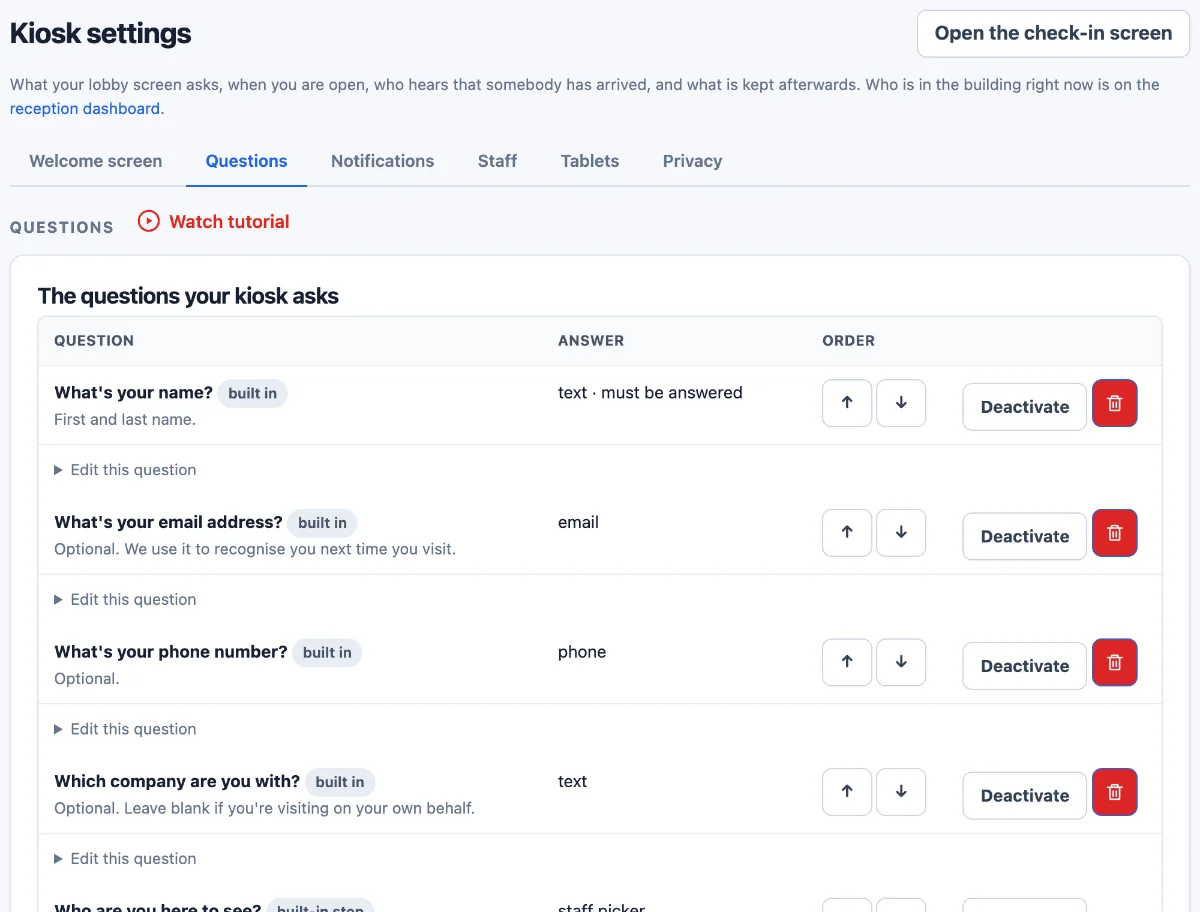
Their name, a phone number or email, and the resident they are visiting, typed in answer to a question you add, such as “Which resident are you visiting?”. You choose whether phone, email and the resident are required. The time and date are stamped by the system, not typed.
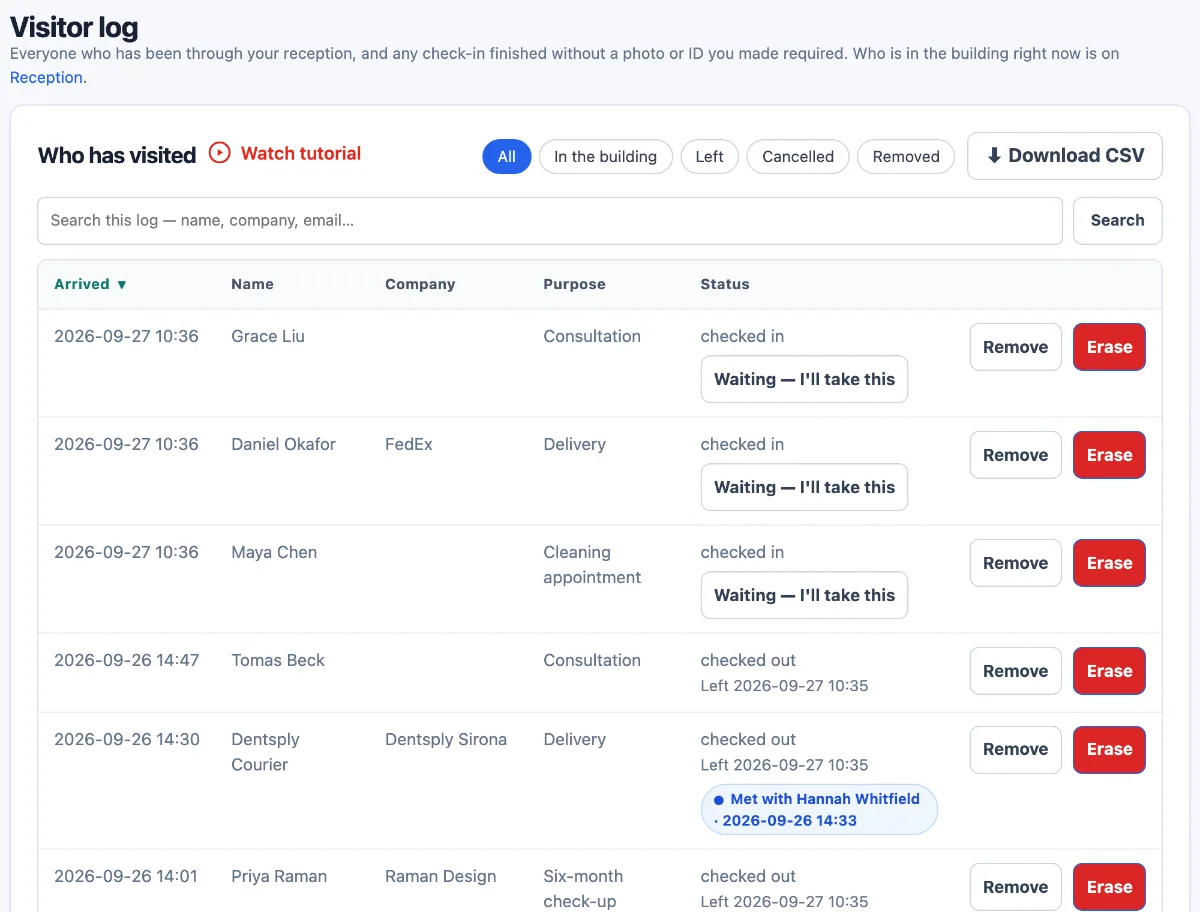
Every visit, newest first. Search by a visitor's name, filter to who has left, and download the log as a CSV file with the names, contact details and times, and a column for the resident each visitor named. The resident is in the download, not in the list on screen.
Keep visitors' details, or have them cleared after a number of days you choose. Clearing empties the details; the visit and its times stay on the log. For s.267(2), pick 30 days or more.
Ask for the resident with your own question, not the tablet's built-in “Who are you here to see?” step: that step matches what is typed against your staff list, so a resident who shares a name with a member of staff would be filed as a visit to that member of staff. Deactivate it, so visitors are asked once. With it off, each sign-in sends an arrival note to the staff you choose, or to your account's admins until you choose; the note never includes the resident's name. If your resident question is optional, a visitor who skips it leaves that column of the download blank.
Caregiver designations are recorded by your staff, as your visitor policy describes; the tablet does not decide who is a caregiver.
At the front desk
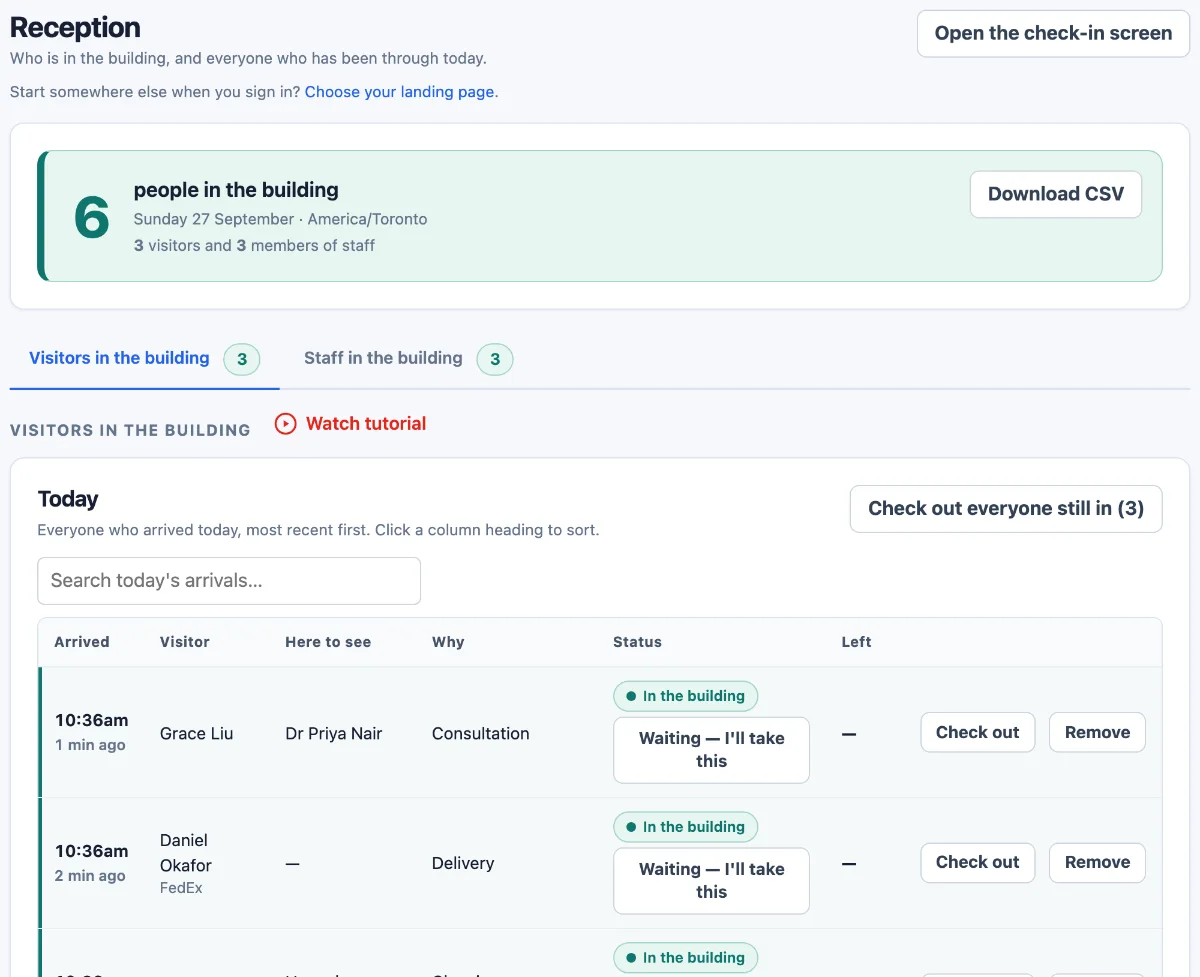
Reception sees the visitors who have signed in today and have not yet signed out. Staff can sign anyone out with one button, and anyone left from an earlier day is shown apart, so the list is not quietly wrong.
It is a list of people who used the tablet. It is not a locator and it does not follow anyone around the home.
Privacy
The application, its database and your files are stored in Azure's Canada Central region. Text messages and AI features are processed in the United States; who and where.
The minimum the regulation asks a home to keep its log
The longest you can set before details are cleared, or keep them
The most that cleared details remain in our database backups
Two-factor sign-in, for each login that turns it on
Keep the details visitors gave, including the resident they named, or have them cleared after the number of days you set. Clearing empties those details; it does not delete the visits themselves, so the log still shows each visit and its times.
Staff can take one entry off the log, such as a duplicate or a test, without touching the rest.
Runs in the browser on a tablet you already have. No app to install.
Free templates
Print them, edit them, keep them. No sign-up.
A printable visitor log laid out to match the fields in O. Reg. 246/22 s.267(2).
Not legal advice. Last checked 7 October 2026 against O. Reg. 246/22 s.267(2).
A checklist for reviewing a home's written visitor policy against O. Reg. 246/22 s.267(1).
Not legal advice. Last checked 7 October 2026 against O. Reg. 246/22 s.267(1).
Pricing
The same plans as every Digital Front Desk customer, in Canadian dollars. Asking for the resident visited and setting your own retention use the plans' "your own questions" and "retention rules", which start at Practice.
A single reception desk.
CAD per month, billed monthly
$55 a month billed annually
A clinic, firm or office with a full team.
CAD per month, billed monthly
$96 a month billed annually
A care home, campus or multi-building site.
CAD per month, billed monthly
$319 a month billed annually
Prices in CAD, per site, per month. Prices exclude tax.
One entrance at one home, on a paid plan, set up with you. Ask for one and we reply within one working day to agree the details.
Questions
What administrators, directors of care, IPAC leads and front-desk staff ask before a tablet goes by the door, answered from what the product does today.
Written for Ontario long-term care homes. Retirement homes are regulated under the Retirement Homes Act, 2010, and s.267 does not apply to them, though the same sign-in works there.
Whatever the tablet asks, stamped with the time and date by the system. Set it to ask for the visitor's name and contact information, and add your own question for the resident visited, such as “Which resident are you visiting?”, and each entry holds the three items in s.267(2). Phone and email are optional until you make one of them required; each is set on its own, so the tablet cannot ask for one or the other. Make the resident question required and no visitor can skip it. The resident is in the CSV download of the log, in a column of its own.
As long as you set. Until you change it, nothing is cleared. The regulation asks for a minimum of 30 days, so if you have details cleared, set 30 days or longer, up to ten years; your own policy may ask for more. Do not pick the option that clears details as soon as a visit is over: that is well inside 30 days.
When the time is up, the details visitors gave are cleared, the resident they named included; the visits themselves are not deleted. A visitor who has been back since keeps their name and contact details until their latest visit is that old too. A CSV you have downloaded is your own copy, and cleared details can remain in our database backups for up to seven days.
The CSV download of the log: each visit's time and date, the visitor's name, phone and email, and the resident they named. To see one resident's visitors, open it in a spreadsheet and filter the resident column; the search on screen finds visitors, not residents. One download holds up to 5,000 visits, in the order the list on screen is sorted. We cannot tell you what an inspector will ask for: the log holds what the tablet was set up to ask.
Not on its own. The tablet does not decide who is a caregiver or an essential visitor, and it has no outbreak mode. Section 267(1) asks for a written visitor policy and a written record of caregiver designations; your staff keep both. You can add a question asking whether the visitor is a designated caregiver, and change your questions at any time, during an outbreak for example, but an answer is what the visitor says, not a check.
The regulation also asks for the current policy to go to the Residents' Council and Family Council (s.267(3)), into the information package for residents (s.264(2)), onto the information posted in the home (s.265(1)) and onto the home's website (s.271(1)(g)), unless the home is somewhere without consistent and reliable internet service, where s.271(2) does not require a public website. Our visitor policy checklist walks through each.
Yes, as questions of your own, worded as your policy asks. The Ministry of Health's outbreak recommendations (February 2025), which long-term care homes can use as guidance, describe passive screening as part of being prepared, and active screening of visitors as a measure your public health unit may recommend during an outbreak.
The answers are kept with the visit and are in the CSV download. They are not on the reception screen or in the arrival note. You can set an answer to tell the front desk that someone at the tablet needs them, during the opening hours you enter; that message does not say what was answered. No answer stops a sign-in: who comes in is still your staff's decision.
Visitors do not sign out at the tablet. Staff sign a visitor out on the reception screen, with one button, and the time is recorded. A visit still open after 3 a.m. the next day, on your home's clock, is closed automatically within the hour and marked that way, with no departure time made up for it. Section 267(2) does not ask for one.
No screen lets anyone edit what a visitor entered, or the time stamped on it. Staff can remove an entry, such as a duplicate or a test: it leaves the screens and the download, and can be put back. Erase goes further: it empties the details that sign-in holds, the resident they named included, and those do not come back. The visitor's own name and contact details are cleared too once no other visit of theirs is left on the log; while one is, they stay with it, and would show again on an erased entry put back. Erasing inside your retention period removes details s.267(2) asks you to keep, so it is for entries that should not be there at all.
Stored in Canada: the application, its database and files are in Microsoft Azure's Canada Central region. Arrival notes sent by email are delivered from Canada; sent by text, they go through Twilio in the United States and can include the visitor's name. AI features are processed in the United States, and the sign-in on this page uses none of them. Our sub-processor list says who receives what, and where.
Treat it as such unless your privacy officer decides otherwise. The operator of a long-term care home is a health information custodian under PHIPA (s.3), and PHIPA counts even the fact that someone is a resident of a facility as personal health information (s.38(3)). For a custodian, our privacy policy describes our role as its electronic service provider and, in most configurations, its agent.
Either way, the product keeps the resident out of arrival notes, off the reception screen and off the list on screen, and clears it with the other details when your retention period ends.
People you give a login to your account. Every login sees the whole log and can download it, so give logins to the staff who need them; the tablet itself cannot open it. Each login can turn on two-factor sign-in. Traffic is encrypted in transit and passwords are hashed; visitor details are stored as ordinary text in the database, not encrypted field by field.
Two places to know about. Arrival notes include the visitor's name unless you switch that off; then they say only that a visitor has arrived. And a visitor who gives a phone number or email is added to your account's contacts list, unless you switch that off on the Privacy tab or ask their permission first with a question of your own. Neither your retention setting nor Erase clears the contacts list, so a home that does not want one should switch it off.
It does not print badges: the last screen shows a badge number, never a name. Photos and ID are off unless you switch them on, and the sign-in on this page needs neither. Where ID reading is on, the picture is read by an AI service in the United States and, unless you choose to keep it, is not saved.
A tablet with a web browser, such as an iPad, a stand, power and Wi-Fi; there is no app to install. The tablet sets itself up when its camera scans a code from your kiosk settings, and its own lock (Guided Access, on an iPad) keeps visitors on the sign-in page. It cannot open your visitor log or your settings, and if one goes missing you can disconnect it from your settings at once. A second entrance is a second tablet on the same account, writing to the same log.
The tablet needs a connection to take a sign-in; it does not save sign-ins to send later. Keep a paper log at the door for those times. Our free visitor log template asks for the same required information as the tablet, when the tablet's resident question is set up for it. On Campus, if visitors cannot sign in, our support line answers at any hour.
It asks one question per screen, in large type with large buttons, and says at the start how many questions there are. It can also read each question aloud, if you switch that on. A visitor who would rather not use it can be signed in by a member of staff on the same tablet.
The buttons and messages are in English. You choose the wording of every question, the standard name and contact questions included, and of the welcome line, so the questions can be in French or in both languages.
Staff on your staff list sign in and out by scanning a QR poster at the entrance with their own phone. Agency staff and contractors who are not on the list use the tablet, like any visitor. Reception can download a list of the visitors and staff who have signed in and not signed out. It lists people who used the tablet or the poster, not residents, and it is only as complete as those sign-ins and sign-outs.
No. It sits at the front door and records visits. It does not ask for resident clinical information and does not connect to PointClickCare or any other EHR; the CSV download is how the log leaves it.
Asking for the resident and setting your own retention need Practice or Campus. The plans are sized by the number of people, as the cards above show, and which one fits your home is agreed with you before a paid pilot starts. Prices are in CAD and exclude tax.
Set the questions and retention up yourself: Try it free. Or have a paid pilot set up with you on a call: Request a paid pilot.
Front-desk staff need three things: the reception screen, signing a visitor out, and downloading the log. Each of those screens carries a short video guide.
Our privacy policy, sub-processor list and retention page are public: where data is stored, who receives it and how long backups keep it. The prices on this page are published list prices. If you close your account, we make a complete export of your records for you before anything is deleted. For anything else your review needs, ask on the form below.
Book a demo or a paid pilot
We will show you the sign-in and the log. Asking for a paid pilot? Tell us your home, who there will own it and when you would like to start.
Rather look on your own first? Try it free.