
Visitor sign-in sheet
A plain visitor sign-in and sign-out sheet for an office, clinic or front desk.
Not legal advice. Last checked 15 October 2026 against PIPEDA principle 4, limiting collection.
Visitor management software
Your own tablet becomes the check-in screen. Visitors, patients and contractors sign themselves in, the person they came to see can get a text or an email, and staff sign in and out from their own phones. Reception sees who has signed in, and the log keeps everyone who came.
No card to try it. Prefer paper for now? Download the free visitor sign-in sheet.
At the door
In the tablet's browser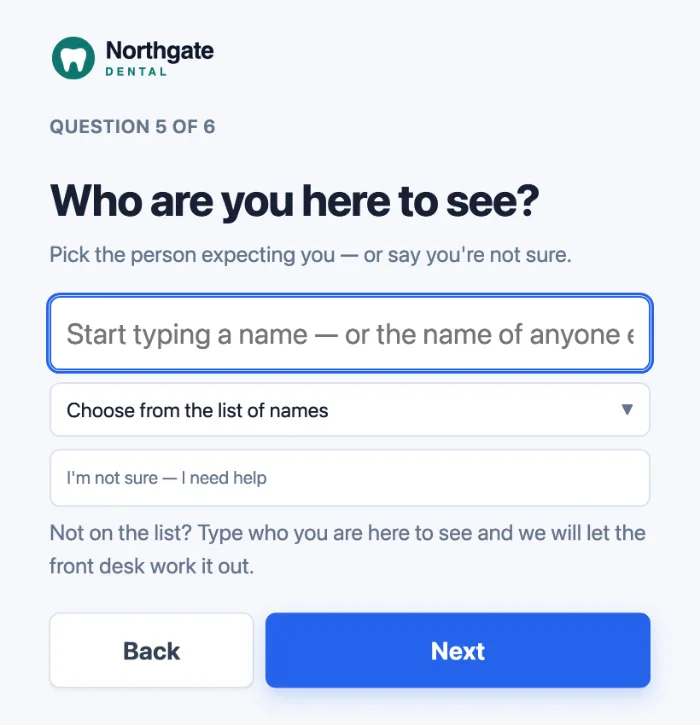
How it works
The same screens for an office lobby, a clinic waiting room or a site office, and they work the day you sign up.
Your logo and greeting, then one question at a time in large type: name, who they are here to see, what brings them in. Anyone unsure who to ask for can say so. The last screen shows a badge number and no name, because a waiting room can read over somebody's shoulder.
The person they picked from your staff list gets a text or an email, if you have set them up for alerts, with a link to take the visit and one to close it. Neither needs a login. A message can be delayed or fail to arrive, so keep a phone number by the tablet.
A live list of who has signed in and out, visitors and staff together, with a CSV download. The visitor log keeps every visit, searchable, and what is kept and for how long is your setting.
A QR poster at the staff door. Scan it, pick your name once, then one tap to sign in or out. No app and no password, and it does not use the phone's location. Included in every plan.
Contractors sign in on the same tablet. From the Practice plan up, add your own questions, such as a required tick for the site rules; the answers are in the CSV download.
The check-in screens can be set to English, Spanish or French. The questions are yours, in the words and language you choose.
Part of one front desk. A check-in can add the visitor to your client list, or update the record of someone who already called or sent a form, if your privacy settings allow it. How the pieces fit.
What it is not
It does not print badges. The screen shows a badge number, which is in the log, so it can go on a pass you hand out.
No desk booking and no room panels. It signs visitors and staff in and out, and tells the right person.
The tablet needs a connection to sign anyone in. Keep a paper sheet beside it for the day the Wi-Fi drops.
Your data
Digital Front Desk is built by Moneli Automation, a Canadian company. The application, its database and its files run in Microsoft Azure's Canada Central region. Arrival texts are carried by Twilio in the United States, and the kiosk's animated presenter, where it is switched on, is rendered by Azure Speech there too. The sub-processors page is the full list of who receives what, and where.
Photographs of visitors. The check-in screen takes none unless you choose to ask for one.
Keep what visitors typed, clear it after a set number of days, or clear it when the visit is over. Your own retention rules start at Practice.
Ask us for a Business Associate Agreement (BAA). It does not connect to your EHR, and it does not need your clinical records.
Pricing
In Canadian dollars, and billed in CAD: we do not show a US-dollar price, because the bill would not match it. Visitors are unlimited on every plan, and paying for the year takes 20% off.
A single reception desk.
CAD per month, billed monthly
$55 a month billed annually
A clinic, firm or office with a full team.
CAD per month, billed monthly
$96 a month billed annually
A care home, campus or multi-building site.
CAD per month, billed monthly
$319 a month billed annually
Prices in CAD, per site, per month. Prices exclude tax.
More than 500 people? Tell us what you need.
Free templates
Word, Excel and PDF. Free, no sign-up.
A plain visitor sign-in and sign-out sheet for an office, clinic or front desk.
Not legal advice. Last checked 15 October 2026 against PIPEDA principle 4, limiting collection.
A sign-in sheet for contractors arriving at a plant or warehouse.
Not legal advice. Last checked 7 October 2026 against OSHA 29 CFR 1910.38(c).
Questions
Straight answers, including the things the tablet does not do.
Digital Front Desk is priced by the number of staff, not by visitors or tablets: Starter $69 for up to 20 staff, Practice $120 for up to 50 staff, Campus $399 for up to 500 staff, per month, in Canadian dollars (CAD). Paying for the year takes 20% off every plan. Visitors are unlimited on every plan. Prices exclude tax, and you are billed in CAD; we do not quote a US-dollar price, because the bill would not match it. See the plans.
In Canada. The application, its database and its files run in Microsoft Azure's Canada Central region. Some work happens in the United States, including arrival texts, carried by Twilio in the United States, and the kiosk's animated presenter, where it is switched on, rendered by Azure Speech. Arrival emails go through Zoho Mail in Canada. The sub-processors page is the full list. While information is in another country it is subject to that country's laws. Who receives what, and where.
Yes. Patients check themselves in on your tablet, one question at a time, and the person they are seeing can get a text or an email. The last screen shows a badge number and no name, so nobody in the waiting room reads who came in. It does not connect to your EHR or practice-management software, and it does not need your clinical records: it runs the front desk and works alongside the system that keeps the chart. A US practice can ask us for a Business Associate Agreement (BAA). For therapy and counselling practices.
A tablet with a web browser, such as an iPad, a stand, power and a connection. The check-in screen is a web page, not an app, and the tablet is yours: there is no hardware contract. It does not print badges. At the end of a check-in the screen shows a badge number, which is in the visitor log, so it can go on a pass you hand out.
Yes. Contractors sign in on the same tablet, and from the Practice plan up you can add your own questions, such as a required tick for having read the site rules. The answers are in the visitor log's CSV download, a column per question. It does not check insurance or training certificates. Free contractor sign-in sheet.
The tablet is the front desk. A visitor picks who they are there to see from your staff list, and if you have set that person up for alerts, they get a text or an email with a link to say they will take it. If the visitor names nobody, the people you chose for unclaimed arrivals are told. A message can be delayed or fail to arrive, so post a phone number by the tablet as well.
As little as does the job: the visitor's name, who they came to see, and the time in and out, plus a company for contractors. Every extra question is something you have to keep safe and eventually delete. From the Practice plan up you write your own questions and set how long the answers are kept, and the next visitor never sees the names before theirs. Free visitor sign-in sheet.
Yes, on every plan. Put the QR poster at the staff entrance; staff scan it with their own phone, pick their name once, and tap to sign in or out. They count on the same list as visitors. It does not use the phone's location.
Yes. The check-in screens can be set to English, Spanish or French, and the built-in buttons and screens follow. The questions you write are your own, so write them in the language you need.
No. The tablet needs a connection to sign anyone in; it does not store check-ins and send them later. Keep a paper sheet beside it for the day the connection drops.
Yes. You can try it free on your own, with no card, or book a demo and we will walk through it with you. More than 500 staff, or several sites? Tell us what you need. Try it free.
Book a demo
Tell us about your office, clinic or site. We will show you the check-in, the host message and the live list, and tell you honestly whether it fits.
Rather look on your own first? Try it free.